
博客阅读指南
这是一篇置顶导航页,用来快速浏览这个博客里已经整理出来的内容。 如果你想按时间看更新,可以去归档页;如果你想按主题看内容,可以直接从下面开始。 RL 强化学习基本概念及入门 CoRL2025论文集 DL 人生苦长我用jax ubuntu tmux常用命令 ubuntu软件推荐以及美化建议 Lazyvim 配置中的 tree-sitter兼容问题解决 温和地走进GNU/Linux 终端 计算机教育缺失的一课 ubuntu / vscode / platformio ubuntu platformio问题 ubuntu / docker ubuntu22.04安装docker ubuntu / PX4 PX4固件编译 ros2-px4联合仿真环境配置1(SITL) ros2-px4联合仿真环境配置2(SITL) px4 ctrl for ROS2 未分类 collection 希望我能完成这个庞大的项目 if (typeof lightGallery !== 'undefined') { var opti...
fly
我的宿舍床位每天都会产生一只果蝇。 苍蝇的英文是fly,不知道果蝇的是不是,不重要了,fly是我初中英语学会的第一个多意词,在我的认知中,飞翔是自由的象征。 于是每天都有一个小黑点在我面前画八字,我找了很久没有找到它为什么每天都会出现。 每次我拍死一只又会跑出来一只。 我每天都会定时丢垃圾并且打扫座位,但是还是不知道是哪里的水果烂了长出来的果蝇。 而且我也不怎么吃水果,吃水果太麻烦了,还要去超市买,有的水果还要去皮,有的还要吐核,我太累了实在没有多余的精力来做这些。 更没有多余的精力去杂物堆里清理是否有哪个水果被我遗忘了. 于是我渐渐习惯了这只果蝇的存在,反正每天只出现一只,就算他不出现我也知道它一直在。 我渐渐的不对果蝇的出现感到愤怒,也不再气急败坏地想要拍死他。 一如我的博士生活,毕业的压力一直存在,做不出东西的压力一直在,我也不像一开始一样对此感到焦虑了,反而让我感到平静如水。 做出来了又怎么样,做不出来又怎么样,正如那只果蝇一样,拍死了怎么样,还会出现一只,拍不死又怎么样,反正只有一只。大不了再多磨磨,果蝇会停止它的繁衍,我也会磨出一些毕业成果,即便看起来就和烂掉的水果一...
利用SSH进行内网端口转发tensorboard
在远程服务器训练时使用 TensorBoard 查看日志在远程服务器上训练模型时,通常可以通过 SSH 端口转发 在本地浏览器查看远程服务器上的 TensorBoard 日志。 先 SSH 登录到远程服务器: 1ssh username@server_ip 然后启动 TensorBoard: 1tensorboard --logdir /path/to/logs --host 127.0.0.1 --port 6006 如果是 PyTorch 项目,只要日志是通过 SummaryWriter 写入的,也可以直接用 TensorBoard 查看。 3. 在本地电脑设置端口转发在本地电脑新开一个终端,运行: 1ssh -L 6006:127.0.0.1:6006 username@server_ip 如果服务器 SSH 端口不是默认的 22,例如是 2222,则使用: 1ssh -p 2222 -L 6006:127.0.0.1:6006 username@server_ip 这条命令的含义是: 本地 localhost:6006 -> 远程服务器 127.0.0.1...

PX4固件编译
环境:ubuntu22.04 PX4:1.16硬件:NxtPX4 资料链接: https://github.com/HKUST-Aerial-Robotics/Nxt-FC.git 我选用的是港科大开源的NxtPX4 1234sudo apt install python3-pipsudo apt install gitpip3 install empy==3.3.4 # 固定empy版本为3.3.4 PX4环境配置下载PX4代码及其子模块 1git clone https://github.com/PX4/PX4-Autopilot.git --recursive 再次确认是否下载完全 123cd PX4-Autopilotgit submodule update --init –recursive 安装完成后可以查看飞控代码版本 12cd PX4-Autopilot/git describe --tags 我选择切换到了1.16稳定版来开发,这个根据自己的选择来选版本 123git fetch --tagsgit checkout v1.16.0git subm...

温和地走进GNU/Linux 终端
在使用各种AI工具的时候我们会发现AI总是会积极地使用命令行工具,那么这些命令行工具是如何给AI提高效率的,又是如何使用的,接下来跟随豹哥的脚步一探究竟。 ctrl+alt+t 这是打开终端的快捷键,所有的操作都将在此完成。 通常最常用的命令应该是ls,用于查看当前目录下有什么文件/文件夹。 实际上ls是一个可执行程序,ls这个可执行程序的位置可以通过。 1which ls 来查看 12li@li-MS-7C94:~$ which ls/usr/bin/ls 实际上which也是一个可执行程序,也可以用which来查看他的位置。 12li@li-MS-7C94:~$ which which/usr/bin/which 这些可执行程序都在/usr/bin/目录下,为什么我们的程序能找到这个目录下的程序呢。 因为我们的终端环境变量里写入了/usr/bin这个路径。 我们可以直接输入下面的命令来查看PATH里到底写了什么。 1echo $PATH 你会看到一长串路径,它们之间通常用:分隔,例如: 1/usr/loca...
ros2-px4联合仿真环境配置2(SITL)
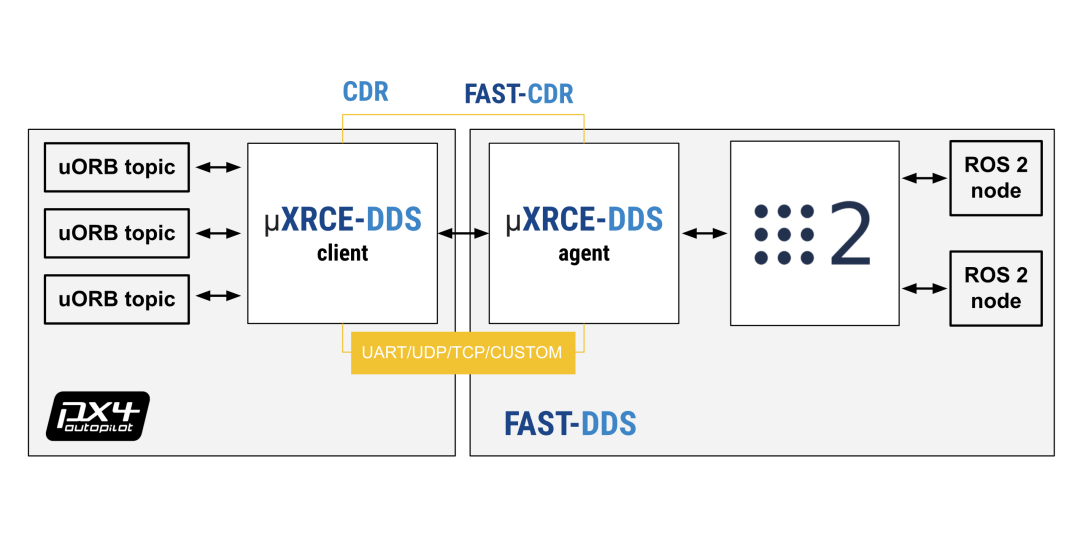
ROS2话题与PX4消息队列通信在上一节的仿真示例中,px4程序和ros2通信是通过XRCE-DDS进行桥接的 XRCE-DDS可以将px4程序内部的uORB消息和ROS2的节点话题进行互相转换(如图所示,当然前提是用px4_msgs这个话题包提供的接口) 在转换的同时也会进行时间同步,即ROS2内部的时间与PX4的时间同步 可以通过以下操作来感受下桥接和同步的过程 123#启动编译好的px4 SITL程序cd PX4-Autopilot./build/px4_sitl_default/bin/px4 此时直接启动地面站可以控制无人机 1./QGroundControl-x86_64.AppImage 此时可以监视一下ros2 topic list可以发现没有px4的信息传过来 1watch -n 1 ros2 topic list # 每1s查看ros2 topic list 然后启动XRCE-DDS,就会看到PX4的话题出现了 12# 启动XRCE-DDSMicroXRCEAgent udp4 -p 8888 自定义PX4的话题通信传入传出PX4的话题可以在X...

ros2-px4联合仿真环境配置1(SITL)
ROS2 安装以及相关环境配置推荐使用鱼香ROS一键安装 1wget http://fishros.com/install -O fishros && . fishros 按照文字提示操作 注意现在各大镜像源大部分都没有ros2 foxy的镜像,需要在官方源下载 1234sudo apt install python3-pipsudo apt install gitpip3 install empy==3.3.4 # 固定empy版本为3.3.4 PX4环境配置下载PX4代码及其子模块 1git clone https://github.com/PX4/PX4-Autopilot.git --recursive 再次确认是否下载完全 123cd PX4-Autopilotgit submodule update --init –recursive 安装完成后可以查看飞控代码版本 12cd PX4-Autopilot/git describe --tags 我选择切换到了1.16稳定版来开发,这个可选可不选 123git fetch --tagsgit c...
人生苦长我用jax
为什么选择 JAX?JAX 是 Google 开发的数值计算库,具有以下特点: 函数式编程:所有函数都是纯函数,没有副作用 即时编译(JIT):通过 @jit 装饰器可以将 Python 代码编译成高效的 XLA 汇编 自动微分:通过 grad、value_and_grad 等函数自动计算梯度 向量化:通过 vmap、pmap 轻松实现批量和分布式计算 GPU/TPU 支持:可以在 GPU 和 TPU 上运行 Flax 基础什么是 Flax?Flax 是 JAX 上最流行的神经网络库,它提供了一种声明式的方式来定义神经网络。 核心概念 nn.Module:所有神经网络的基类 @nn.compact:装饰器,用于定义网络结构(在 __call__ 方法内部定义子层) nn.Dense:全连接层 nn.Conv:卷积层 nn.GroupNorm:组归一化 if (typeof lightGallery !== 'undefined') { var options = { selector: '.gallery-item' ...
计算机教育缺失的一课
How to use shell?12man <bin> # 命令参数<bin> -h 1cd # change dir 12head -n3 <data> # 一个文件的开始3行tail -n3 <data> # 一个文件的末尾3行 12grep <key> <data> # 在data中找到含key的内容gerp -r <key> <folder path> # 在文件夹中找含key值的文件 12345# 替换文件内容sed -i 's/<path>/g' */*.mddate > thedate.txt # 覆盖写入文件内容data >> thedate.txt # 追加写入文件内容if (typeof lightGallery !== 'undefined') { var options = { selector: '.gallery-item' }; ...
希望我能完成这个庞大的项目
day0: 2026-03-02 今天测试的时候发现nvim的LSP有误报,clangd找不到头文件路径 解决方法:生成 compile_commands.json 123# 在项目根目录执行cmake -B build -DCMAKE_EXPORT_COMPILE_COMMANDS=ONln -s build/compile_commands.json . day1: 更新了一下架构,正在思考积分器选什么来实现以及怎么做robot_model解析 day2: 今天才知道有rr,strace, 这么多好用的debug工具,原来一直print大法的我大开眼界 https://www.youtube.com/playlist?list=PLyzOVJj3bHQunmnnTXrNbZnBaCA-ieK4L llvm学习中,推荐一个博客:https://badumbatish.github.io/posts/hitchhiker_guide_to_llvm_debugging 我突然发觉调试的时候可以用二分法来打断点 day3: 学习数值算法中… day4: 看了一些代码开发的规范...